Blogroll

This is default featured slide 1 title

Go to Blogger edit html and find these sentences.Now replace these sentences with your own descriptions.

This is default featured slide 2 title

Go to Blogger edit html and find these sentences.Now replace these sentences with your own descriptions.

This is default featured slide 3 title

Go to Blogger edit html and find these sentences.Now replace these sentences with your own descriptions.

This is default featured slide 4 title

Go to Blogger edit html and find these sentences.Now replace these sentences with your own descriptions.

This is default featured slide 5 title

Go to Blogger edit html and find these sentences.Now replace these sentences with your own descriptions.

Wednesday, 29 October 2008

Make internet page larger


Some of us does not like small internet pages and displaying lot of browser tools on the screen like the page I shown above.For them it will be interesting if all browser tools are avoided and web page looks larger. For that you have to press F11 button only. Then the page will be like below.By pressing F11 again page goes back to original state.

XP TRICK: STARTING PROBLEM

When we start our computer some unwanted programs will start automatically. I faced this problem many times and I felt it as very irritating.Once i formatted my OS due to this problem.But you can avoid this problem easily.
  • Go to 'start'.
  • Choose 'run'.
  • Type msconfig in the box and click ok.
now a 'system configuration utility' window will appear and in which click 'start up'. There you can see some of programs enabled. you just untick the programs you don't want during starting and press ok.

CHINA MOBILES:ALERT FOR USERS

Recently, heart breaking news are coming out for Chinese mobile users. Indian government is planning to ban sale of mobiles that don’t have IMEI number and whose IMEI number can be changed. So, most of the unbranded mobiles coming from china will come under this ban. If government orders GSM operators such as Airtel, Idea etc will stop services to these mobiles. These actions are taken because, it was found that most of the terrorists are using Chinese mobiles for the conversations. Since these mobiles don’t have IMEI number, intelligence department are continuously failing to track the owners.I think most of the countries will follow this law soon.

Saturday, 11 October 2008

XP Trick: Fake virus


I am going to introduce a method to make a fake virus. You can use this fake virus to kid others. There are lots of tricks to make fake virus, but this must be the simple one. In order to make a fake virus, follow the steps below.
• Right click on desktop, choose ‘new’ then select ‘text document’.
• Rename the new text document file as you want.
• Then double click on new text document file.
• Type the following….
@echo off
echo YOU HAVE A VIRUS ON YOUR COMPUTER
pause
echo CONTATTING ANTIVIRUS
pause
echo DO YOU WANT TO DELETE THE VIRUS?
pause
echo ACCESS DENIED
echo ACCESS DENIED
echo ACCESS DENIED
pause
echo ACTIVATING VIRUS...
echo VIRUS ACTIVATED!!!!
pause
:1
echo
dir/s
goto 1
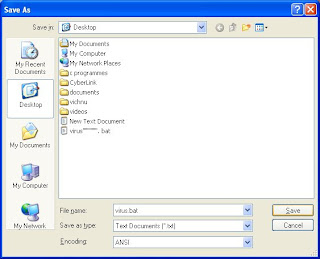
• Then go to ‘file’, then choose ‘save as’ and save the file name as ‘virus.bat’.
• Now you can see a new MS-DOS Batch File is created in desktop.
• Double click new MS-DOS Batch File and follow the instructions.

Now you can see that this program runs like a virus. Using this trick you can frighten your friends.

Friday, 10 October 2008

XP trick: Change your desktop background automatically with time.

This is a cool Windows XP trick by which you can make your desktop background a moving one. That means your computer’s desktop background can be continuously change as you desire. In order to do it just follow the steps mentioned below.
1. Open Windows movie maker.
2. Import the pictures to movie maker. So click ‘import pictures’. Then select some pictures in your computer and import it.
3. Now the selected photos will be there in clipboard. Drag these photos to time line and paste it there. Now you have made a video using those photos.
4. Now click ‘save to my computer’ and save the video you made.
5. Now you can close Windows movie maker and convert the video into ‘gif format’. In order to convert your video into ‘gif format’, log on to www.gifninja.com. Then click ‘convert video to gif’. Then scroll down new window and click ‘browse’ button and select your video saved early. Then wait a little and conversion process will be over. Now you can see your video at the lower part of the site and by selecting your video press right button of the mouse and choose ‘save as’.
6. Now go to the folder where you saved video in ‘gif format’, then set it as desktop background.
Now you can view that your desktop background is changing with time. Now you can try this XP trick in your computer. If it is not working, please write what’s the problem in commends and I will try to solve it.